

Free Agent Console: The Free Mission Control for One AI Agent
If you’re running an AI agent right now, you already know the feeling, and Free Agent Console exists to fix exactly this. One terminal window for logs. Another tab for the chat. A third for checking whether a cron job actually fired last night. You built something genuinely useful, and somehow the only way to check on it is to babysit four scattered windows at once.
That’s exactly the gap it exists to close, and if that’s what brought you here, this is the tool.
If you only read one part of this: Agent Console is a free, open-source, single-file Python app from Perseon AI that gives one AI agent a proper browser dashboard, chat, sessions, cron jobs, skills and voice, instead of you running it from scattered terminals and chat windows.
It’s built Hermes-first, read-only by default, and explicitly not a multi-agent platform. When you outgrow it, Perseon Console is the paid step up.
Key Takeaways
- Free and open source.
- MIT licensed. No account. No paywall on the core repo.
- One single Python file.
- No frontend framework. No bundler. No database of its own.
- Read-only by design.
- Sessions, cron jobs and skills are viewable, not editable, from the console.
- Built for one agent, on purpose.
- Multi-agent management lives in Perseon Console, the paid tier.
- Private by default.
- The README recommends Tailscale over exposing it to the public internet.
What Is an AI Agent Console?
You didn’t set out to become the person who manually checks four different windows just to know if your own agent is still alive. But that’s usually where things end up once an agent moves past a weekend project.
Agent Console is a free, single-agent dashboard built by Perseon AI. It gives one AI agent, specifically a Hermes agent by default, a clean browser interface instead of leaving you to operate it from terminals, chat threads, logs and local scripts.
The README puts the problem plainly: most agentic systems become powerful before they become presentable. Agent Console’s whole reason for existing is to give that power a front door, the same idea we cover in more depth in our guide to mission control for AI agents.
It’s not a framework, and it doesn’t run your agent for you. You bring the agent runtime.
Agent Console gives it somewhere to live that isn’t a terminal window. As an AI Agent Console, its whole purpose is turning a script running quietly in the background into something you can actually see and interact with.

Want to try it yourself? Agent Console is free and open source. Download it on GitHub and have your first agent dashboard running in about ten minutes.
Free Agent Console: What You Get
Every panel in this AI Agent Console maps to a real operational need, not a decorative dashboard widget.
| Panel | What It Does |
|---|---|
| Runtime/status panel | Shows safe profile metadata, gateway status and voice capability flags |
| Chat surface | Talk to your agent through the Hermes gateway, with streaming replies |
| Mission surface | An optional delegated task path, disabled by default and hardened against shell, file-write and MCP tool access when it is enabled |
| Sessions panel | Read-only summaries of recent sessions from the selected profile |
| Cron panel | Read-only view of the agent’s scheduled jobs |
| Skills panel | Read-only inventory of the agent’s skills, scoped to safe namespaces |
| Voice controls | Browser speech fallback, plus optional ElevenLabs text-to-speech and transcription |
| PWA support | Install it to your phone’s home screen like a native app |
That last one matters more than it sounds. It’s genuinely built mobile-first, not just responsive as an afterthought.
Free Agent Console: 7 Role Themes, 1 Codebase
One detail worth knowing before you install it: the same dashboard layout adapts its role, avatar and accent colour based on the profile you select. There are seven built-in themes.
| Theme | Accent Colour |
|---|---|
| CEO | Green |
| COO | Cyan |
| Assistant | Gold |
| Developer | Blue |
| Researcher | Purple |
| Copywriter | Orange |
| Reviewer | Red |
★★★★★
“We’re not in this space whatsoever, we’re a childcare platform, but having this AI Agent Console has been an absolute dream. We’re seriously considering upgrading because it’s just been so worthwhile.”
The Au Pair Club
The COO theme, one of seven built-in role variants
It’s a small touch, but it means the same free tool can look and feel like it belongs to whichever role your agent is actually playing, rather than one generic grey dashboard for every use case.
Free Agent Console: Mobile-First Operator Flow
A lot of dashboards claim to be mobile-friendly and mean “it doesn’t break on a small screen.” This one means something more specific.
On mobile, the list view is the primary screen.
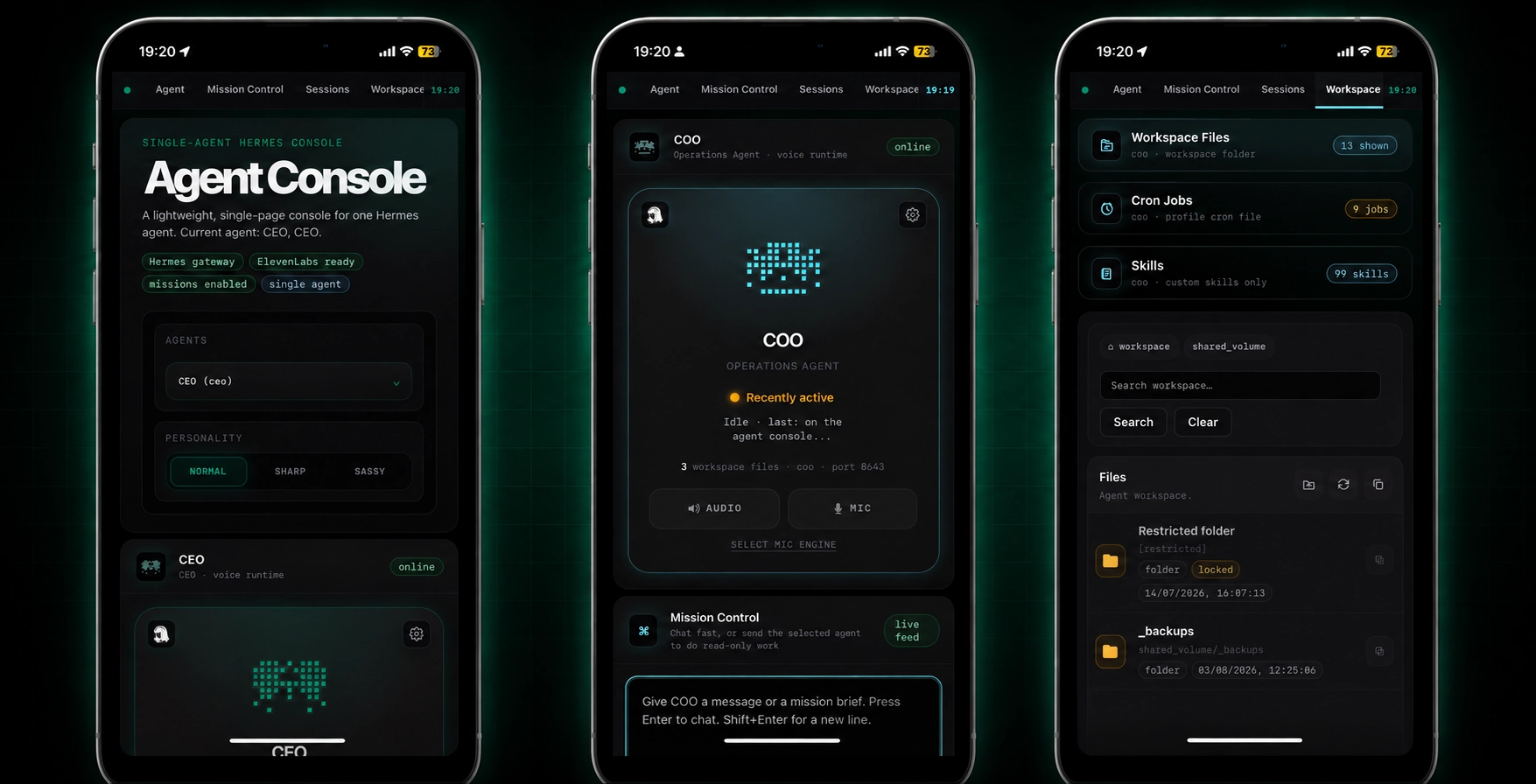
Tap a session or a workspace file and the detail view slides in from the right, taking over the viewport, exactly the pattern you’d expect from a native app rather than a shrunk-down desktop site. Long lists scroll inside their own container, so the page itself stays stable while you scroll through sessions or files.
The point isn’t novelty.
It’s that checking on an agent from your phone, mid-conversation, mid-commute, shouldn’t require squinting at a desktop layout.
Want to try it yourself? It’s free and open source. Download it on GitHub and have your first agent dashboard running in about ten minutes.
Free Agent Console: Add to Phone’s Home Screen
It’s a proper PWA, a progressive web app, which means you’re not just bookmarking a page.
Once it’s added to your home screen, it opens full-screen, without a browser address bar, and behaves like any other app icon on your phone.
Getting it there takes under a minute, and the steps differ slightly depending on your phone.
| Platform | Steps |
|---|---|
| iPhone (Safari) | Open Agent Console in Safari, tap the Share icon at the bottom of the screen, scroll down and tap “Add to Home Screen,” then tap “Add” in the top right |
| Android (Chrome) | Open Agent Console in Chrome, tap the three-dot menu in the top right, tap “Install app” (or “Add to Home screen” on older versions), then confirm |
A couple of things worth knowing before you do this:
- Use your private Tailscale URL, not the local one.
If you install the127.0.0.1address to your home screen, it’ll only work while you’re on the same machine. Install the Tailscale address instead, so it works from anywhere your phone has signal. - The icon behaves like a native app.
No browser chrome, no address bar, just the dashboard, opening straight into whichever role theme you last had selected. - It stays logged in.
You’re not re-authenticating every time you tap the icon, the same way you wouldn’t expect to log into a native app fresh every session.
This is the detail that makes this feel less like a self-hosted tool and more like something you’d actually reach for mid-commute, checking whether an overnight task finished without needing to open a laptop.
Free Agent Console: What It Deliberately Doesn’t Do
This is the section most tools bury or skip. This AI Agent Console’s README states its limits upfront, and they’re worth taking seriously before you install it expecting something else.
It is not: an agent framework, a SaaS starter kit, or a broad multi-agent operations platform. You bring the runtime. It gives that one runtime a front end.
The free tier specifically excludes:
- A multi-agent production plugin stack
- Advanced Kanban, backlog or workflow plugins
- Production deployment packaging
- Commercial Full Stack templates
- Private Perseon personas, memory, prompts or internal operating canon
- Credentials, logs, customer data or host-specific runtime state
If you’re managing more than one agent, this isn’t the tool for that job, and the README says so directly rather than letting you find out the hard way.
Our guide to managing multiple AI agents covers what changes once you’re past one.
Free AI Agent Console: Deliberately Small
The architecture is worth a mention because of how unusually restrained it is for a 2026 web app.
| Layer | What’s Actually There |
|---|---|
| Frontend | No framework, no bundler. HTML, CSS and JS live inside the single Python file. |
| Backend | A Python standard library ThreadingHTTPServer, nothing exotic |
| Database | None owned by the app. It reads your existing Hermes profile’s state.db and cron/jobs.json. |
| Dependencies | Python 3.11 or newer, and the requests package for outbound provider calls |
The whole repository is small enough to actually read before you customise it, which is rarer than it should be in this category of tool. That restraint is unusual for an AI Agent Console built in 2026, when most tools this size ship with a framework and a build step attached.
Getting The Free AI Agent Console Running
- Clone the repo and create a local config:
git clone https://github.com/Perseon-Lab/agent-console.git - Set up a virtual environment and install the one dependency:
pip install requests - Run it locally:
python3 agent_console.py - Open
http://127.0.0.1:4200in your browser - Confirm it’s alive with a health check:
curl -s http://127.0.0.1:4200/health
That’s genuinely the whole process for a local install.
✅ No account creation
✅ No onboarding flow
Want to try it yourself? No account, no paywall. Download it on GitHub and have your first agent dashboard running in about ten minutes.
Keep It Private: The Tailscale Recommendation
Agent Console can show runtime status, sessions, cron jobs, skills and chat controls, which means it sits right next to sensitive agent data. The README is direct about this: do not put it straight on the public internet by default.
The recommended path is Tailscale, a private network that avoids the need to configure public firewall rules, reverse proxies or HTTPS certificates on day one.
Install it on both the machine running it and whichever device you’re checking it from, log into the same account on both, and you get a private URL that only your own devices can reach.
Worth noting for anyone getting an AI coding agent to install this for them: the project’s own agent instructions default to private access first. A coding agent following the official prompts will not expose the dashboard publicly unless you explicitly ask for it and approve the extra security work.
Free Agent Console: Upgrading to Perseon Console
It’s the single-agent tier, and it’s built to feel useful on its own rather than deliberately crippled to push an upgrade.
But the moment your work grows past one agent, the ceiling becomes obvious fast, usually right around the point agent sprawl starts creeping in.
| Tier | Best For | Adds |
|---|---|---|
| AI Agent Console | Builders who want one agent out of the terminal and into a clean UI | Basic operating surface, status, sessions, cron jobs, skills and chat |
| Perseon Console Core | Builders who want a polished paid starting point | Broader app foundation, setup guide, branding and deployment guidance |
| Perseon Console Full Stack | Consultants, agencies and serious builders running more than one agent | Multi-agent workflows, plugin-ready patterns, deeper docs and commercial packaging |
| Perseon Console Install Sprint | Buyers who want help installing it fast | Done-with-you setup and handoff support |
Get the Full Stack offer, or join the waitlist as the paid tiers roll out, through Perseon AI.
Want to try it yourself? Free and open source, no strings attached. Download it on GitHub and have your first agent dashboard running in about ten minutes.
Frequently Asked Questions
Is Agent Console actually free?
Yes. It’s MIT licensed and hosted openly on GitHub, no account, no paywall, no feature gate on the core repo.
Is an AI Agent Console the same thing as an AI agent framework?
No. An AI agent framework, like the runtime your agent actually thinks and acts through, is a different layer entirely. An AI Agent Console sits on top of that, it’s the dashboard, not the engine. Agent Console specifically expects you to already have a running Hermes agent, and gives that agent a front end rather than replacing anything underneath it.
Does the free Agent Console only work with Hermes agents?
It ships Hermes-first, meaning the default profile selection, status surfaces and chat path are built around a local Hermes profile and gateway. For other runtimes, the repo includes adapter prompts for Claude and OpenClaw, plus a generic prompt for custom runtimes, that you paste into a coding agent to port the runtime layer while keeping the existing UI.
Can it manage more than one agent?
No, and it’s explicit about that. It’s built for a single agent by design. Multi-agent management, Kanban workflows and shared knowledge bases live in Perseon Console, the paid tier.
Is it safe to expose it to the internet?
The project recommends against it by default. It shows runtime status, session summaries, cron jobs and skills, real operational data, so the recommended setup runs it privately behind Tailscale rather than on a public IP.
Can I edit my agent’s sessions, cron jobs or skills from the dashboard?
No. Those panels are explicitly read-only. The one exception is the optional mission surface, which is disabled by default and, even when enabled, is hardened against shell access, file writes and MCP tool access.
Do I need to be a developer to install Agent Console?
Basic comfort with the command line helps, cloning a repo, creating a virtual environment, running a Python script. There’s no drag-and-drop installer. That said, the setup is short enough that the repo includes numbered prompts specifically written so a coding agent can install it on your behalf.
What happens to my data if I use the voice features?
Voice has a browser speech fallback that requires no external service. If you configure ElevenLabs for text-to-speech or an OpenAI-compatible endpoint for transcription, those are optional and use your own API keys, not a Perseon-hosted service.
Our Verdict on The Free Agent Console
This AI Agent Console does one job and says so plainly: give a single Hermes agent a real front door instead of a terminal window.
It doesn’t pretend to be more than that, and the README’s honesty about what it deliberately leaves out is rarer than it should be in this space.
If you’re running one agent, this is worth an evening to set up.
If you’re already past that, coordinating several agents across scattered tools, Perseon Console is the natural next step, built by the same team, for exactly the problem it was never meant to solve.
Start with our guides to managing multiple AI agents and taming agent sprawl to see what changes once you’re past one.