
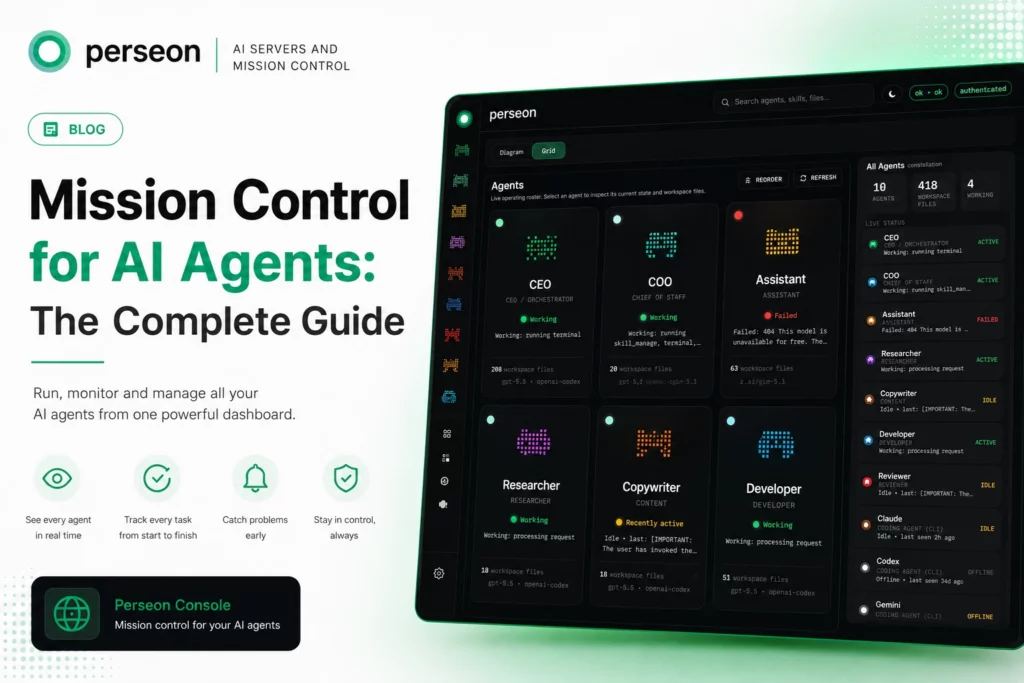
Agent Mission Control for AI Agents: The Complete Guide
If you only read one part of this guide: mission control is a single dashboard that shows every AI agent, every task and every system metric in real time. Without one, agents fail silently, tasks go missing and servers crash without warning.
With one, you see the whole operation at a glance and fix problems in minutes instead of hours. Perseon Console is built to be exactly that.
Key Takeaways
- Mission control solves one problem: agents are good at doing work and bad at telling you.
- The stack has three parts: an agent runtime, a command centre, and a host to run both on.
- You need it sooner than you think. Two to three agents is where checking logs by hand starts costing real time.
- Setup takes about ten minutes once you’ve got a VPS with Docker installed.
- Two real options exist: Agent Console (free, one agent) or Perseon Console (paid, full fleet management).
You built an AI agent. Maybe two. Maybe five.
They run tasks, answer questions and do work while you sleep. But here’s the problem: you cannot see what they’re doing. You don’t know if they finished. You cannot tell if one is stuck or if all of them crashed three hours ago.
That’s the moment you need mission control.
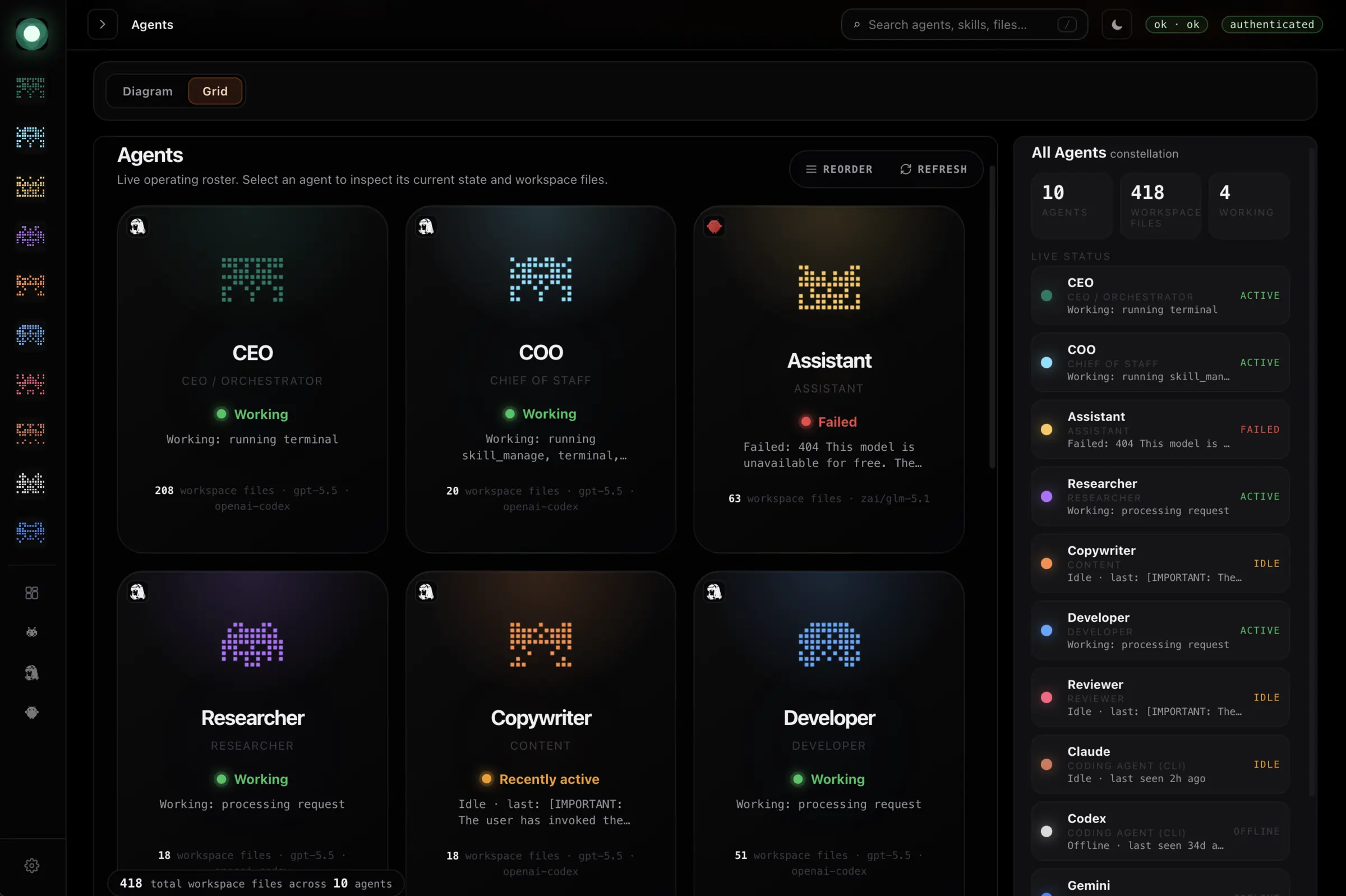
Mission control is a single dashboard that shows every agent, every task and every problem in real time.
Think of it as air traffic control for your AI.
Without it, your agents are flying blind. With it, you see the whole operation at a glance.
This guide explains what mission control does, why it matters, and how to get one running for your own AI setup.
The Problem: AI Agents Without Oversight
AI agents are good at doing work. They’re bad at telling you about it.
Here’s what happens when you run agents without a command centre:
- Agent (A) finishes a task but nobody checks.
- Agent (B) gets stuck in a loop and burns through tokens for hours.
- Agent (C) crashes at 2am and nobody knows until morning.
By then, the damage is done.
The more agents you run, the worse this gets.
One agent is manageable.
Three agents need attention.
Ten agents without oversight is chaos.
You need a way to see what’s happening without opening ten browser tabs or checking logs by hand.
You need mission control ⤵️
Want to try it yourself? Agent Console is free and open source. Download it on GitHub and have your first agent dashboard running in about ten minutes.
What Agent Mission Control Does
Agent Mission control gives you three things.
First, you see every agent in real time.
One screen shows all your agents, what they’re doing right now, and whether they’re healthy or stuck. There’s no more guessing.
Second, you track every task.
Each task gets a status: pending, in progress, review, done. You see what’s waiting, what’s moving, and what’s blocked. Nothing falls through the cracks.
Third, you catch problems early.
When an agent crashes or a task fails, you see it immediately. You fix it before it becomes a bigger issue. That’s the job of mission control. It turns a pile of agents into something you can manage.
Want to try it yourself? Agent Console is free and open source. Download it on GitHub and have your first agent dashboard running in about ten minutes.
Why Checking Logs Alone Doesn’t Work For Agent Mission Control
Many people start by checking logs. They SSH into the server, run a command, and read the output. That works for one agent. It breaks down fast with more.
Here’s why. Logs are history.
They tell you what happened, not what’s happening right now. To see the current state, you have to keep checking. That’s manual work, and manual work doesn’t scale.
Logs are also scattered.
Each agent writes to its own file. To get the full picture, you read ten different logs and piece it together in your head. That’s slow and error-prone.
Mission control puts everything in one place, in real time. You stop checking logs and start watching a dashboard.
Worth knowing: mission control doesn’t replace logs entirely. Logs still matter for auditing what happened after the fact. What mission control replaces is using logs as your only way to see what’s happening right now.
The Agent Mission Control Stack
You need three things to run mission control for AI agents.
| Component | What It Does |
|---|---|
| Agent runtime | Runs your agents. OpenClaw and Hermes Agent are two solid options. Handles calling models, using tools, and executing tasks. |
| Command centre | Watches your agents. Perseon Console shows agent status, task boards and system health in one interface. |
| Host | Somewhere to run both. A small VPS with 4GB of RAM is enough to start, Hetzner and DigitalOcean both work. |
The runtime does the work. The command centre watches the work. The host runs both.
How Perseon Console Works as Agent Mission Control
Perseon Console is a command centre built for AI agent operations. Here’s what it does.
Real-time agent monitoring.
Every agent shows up on the dashboard with its current status. You see which ones are active, which are idle, and which have errors. No more SSH sessions or log tailing.
Kanban task management.
Every task your agents work on appears on a Kanban board. You drag tasks from pending to in progress to review to done. The board tells you what’s happening without reading a single log line.
Brain knowledge graph.
Your agents learn things. They store facts, decisions and context. The brain graph shows how all that knowledge connects, a map of everything your agents know.
Host diagnostics.
CPU usage, RAM usage, disk space, service health, all on one screen. When your server starts running hot, you see it before something crashes.
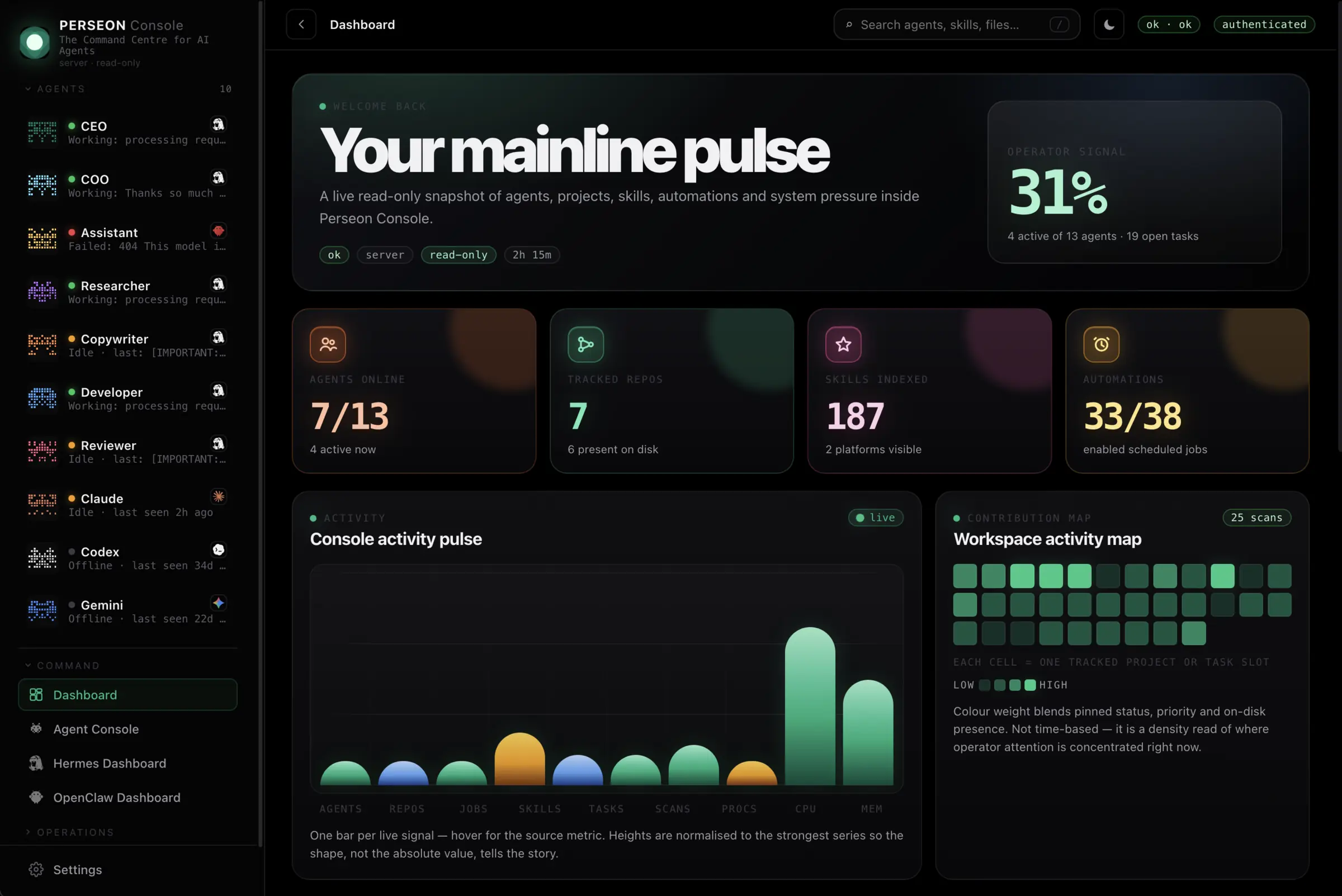
Perseon Console ties the runtime, the tasks and the host into one view.
Want to try it yourself? Agent Console is free and open source. Download it on GitHub and have your first agent dashboard running in about ten minutes.
Our Own Experience: Perseon Console for Our Human Team and Our Agent Team
We don’t just write about mission control, we run on it.
Perseon Console sits at the centre of how our own team, human and agent, works day to day, and it’s worth being specific about where it’s actually helped rather than just saying it’s good.
For our human team, the biggest shift has been confidence. Nobody’s SSHing into a server at 11pm to check if something broke.
The Kanban board means a human reviewer can see exactly which agent tasks are waiting on them, without anyone pinging around asking whether someone’s looked at it yet. Host diagnostics have caught a server running low on resources before it turned into a late-night fire drill more than once.
For our agent team, and yes, we genuinely think of it that way, real oversight has meant fewer stuck loops burning through tokens unnoticed, and fewer instances of an agent quietly failing a task with nobody finding out until a client asked why something didn’t happen.
The brain knowledge graph has been genuinely useful for understanding what our agents collectively know, not just what any single one is doing in isolation.
None of this is theoretical for us. It’s the actual reason we can run agents doing real client work without someone babysitting a terminal window all day.
Why Teams Choose Perseon Console As Their Agent Mission Control
Everything in this guide works whether you build your own dashboard, use a free tool, or go with Perseon Console.
Here’s the honest case for the paid option specifically.
You get fleet-wide monitoring, task management and host diagnostics in one interface on day one, not after weeks of building it yourself. It runs on infrastructure you control, so your agent data doesn’t leave your server.
And it’s built specifically for the operational question, is everything running, rather than retrofitted from a general logging or infrastructure tool.
If you’re past the point of checking logs by hand and ready for a real command centre, see current plans on Perseon Console.
Setting Up Mission Control in 4 Steps
Here’s how to get mission control running.
Step 1: Get a VPS
Rent a small server. Hetzner CX22 (2 vCPU, 4GB RAM) runs about €4.50 a month. DigitalOcean Basic (2 vCPU, 4GB RAM) runs about $12 a month. Either works.
SSH into the server and install Docker. That’s your foundation.
Step 2: Install an Agent Runtime
Pick OpenClaw or Hermes Agent. Both are open source and run in Docker.
Your agent runtime is now live.
Step 3: Install Perseon Console
Pull the Console image and run it. Your command centre is now live.
Step 4: Connect Them
Open Perseon Console in your browser. It auto-discovers your agent runtime. You now see every agent, every task and every system metric on one screen.
That’s mission control. Four steps, two containers, one dashboard.
What Mission Control Looks Like in Practice
Here’s a real scenario. You have three agents running:
Agent (A) is a research assistant, it finds information and writes summaries.
Agent (B) is a code reviewer, it checks pull requests and leaves comments.
Agent (C) is a customer support bot, it answers questions from users.
Without mission control, you check each agent by hand.
You open three logs, read through them, and hope nothing’s broken. That takes ten minutes every time you check.
With mission control, you open one dashboard:
- Agent (A) is green, running fine.
- Agent (B) is yellow, it has a task stuck in review.
- Agent (C) is red, it crashed an hour ago.
You fix Agent C, unblock Agent B, and you’re done in two minutes.
That’s the difference. Mission control turns ten minutes of log reading into two minutes of dashboard watching.
Pros and Cons of Running Mission Control
Every one of these pros has a matching cost on the other side, the cost of not having it.
| With Mission Control | Without It |
|---|---|
| See every agent’s status in real time | Agents fail silently for hours before anyone notices |
| One task board shows what’s pending, blocked or done | No clear picture of what’s finished, stuck or lost entirely |
| Catch resource issues before they cause a crash | The server crashes without warning, taking every agent down with it |
| Add new agents without adding manual checking work | Every new agent means another log file to read by hand |
| Spend minutes a day on oversight | Lose hours a week piecing together scattered logs after something breaks |
The honest downside of mission control itself: it’s another piece of software to run, and it becomes a single point of visibility, if the dashboard goes down, you’re temporarily back to checking logs by hand.
That’s a real trade-off, not a reason to skip it, but worth knowing going in.
Still, weighed against an agent crashing at 2am and nobody finding out until morning, most teams take that trade-off without hesitation.
If that scenario sounds familiar, see how Perseon Console catches it before it costs you a day.
Common Mistakes When Running AI Agents
People make the same mistakes when they start running agents. Mission control fixes most of them.
Mistake 1: Running agents without monitoring.
You set up an agent and forget about it. When it breaks, you find out days later. Mission control shows you the moment something goes wrong.
Mistake 2: No task tracking.
Agents do work but you can’t tell what they finished or what’s still pending. Mission control gives every task a status so you see the full picture.
Mistake 3: Ignoring system health.
Agents use CPU and RAM. When the server runs out, everything crashes. Mission control shows resource usage so you catch problems before they happen.
Mistake 4: Scaling without oversight.
You add more agents but don’t add more visibility. More agents means more problems. Mission control scales with you, showing ten agents as clearly as it shows one.
When to Upgrade to Mission Control
| Your Setup | Do You Need It? |
|---|---|
| One agent, simple tasks | Nice to have, not essential. Check logs occasionally and fix problems as they appear. |
| Two to three agents, regular tasks | This is where it starts paying off. Checking each agent by hand takes real time now. |
| Five or more agents, complex workflows | Essential. Without it you’re flying blind, and problems pile up before you notice. |
| Ten or more agents, production workloads | Non-negotiable. You cannot manage this scale without real-time visibility. |
The rule is simple. The more agents you run, the more you need mission control.
Mission Control vs Building Your Own Dashboard
You could build your own dashboard. Many people try. Here’s why most give up.
Building a dashboard means writing a frontend, connecting it to your agent runtime, pulling in system metrics, and keeping it updated.
That’s weeks of work for a basic version and months for something useful.
Perseon Console gives you all of that out of the box: agent monitoring, task management, brain graph, system diagnostics.
Already built, already tested, already maintained.
Building your own makes sense if you have highly specific needs that no existing tool covers. For everyone else, a ready-made command centre gets you to mission control faster.
Mission Control vs Agent Observability Tools
Search around this space and you’ll run into a different category of tool: agent observability platforms like LangSmith, Langfuse, AgentOps and Arize.
Worth understanding the difference before you assume they solve the same problem, because they don’t.
Observability platforms trace what happened inside a single agent run: which model call fired, what a tool returned, exactly where a multi-step chain went wrong. They’re built for debugging quality and catching regressions, often paired with evaluation datasets and scoring against a benchmark.
Mission control answers a different question: is my fleet running right now, and does anything need my attention today.
It’s operational, not diagnostic.
You’re not digging through a trace to work out why one response was wrong, you’re checking whether Agent C is stuck.
| What You Need | Best Fit |
|---|---|
| See whether agents are running, stuck or crashed, right now | Mission control |
| Debug why one specific response was wrong, step by step | An observability platform |
| Track tasks across a fleet on a Kanban board | Mission control |
| Score outputs against an evaluation dataset | An observability platform |
| Watch host CPU, RAM and disk in the same view as agent status | Mission control |
Plenty of teams eventually want both, observability for quality and debugging, mission control for daily fleet oversight.
If you’re running a handful of agents and mainly need to know they’re alive and moving, mission control covers most of what you’ll reach for day to day.
Want to try it yourself? Agent Console is free and open source. Download it on GitHub and have your first agent dashboard running in about ten minutes.
Where Your Agent Data Actually Lives
Worth spelling out, because it’s easy to miss and it matters more than it sounds: Perseon Console runs on your own server.
Agent data, task history and system metrics stay on the VPS you’re already paying for. Nothing ships off to a third-party platform just so you can see your own dashboard.
For any team handling something sensitive, customer conversations flowing through a support agent, proprietary code reviewed by a code agent, that’s not a small detail.
It’s the difference between your data staying inside infrastructure you control and it living on someone else’s servers by default.
Self-hosting does mean you own the maintenance too, updates, backups, uptime. That’s a fair trade for teams who care about where their data sits.
If that’s not a priority for you, a fully managed SaaS tool might involve less upkeep, just with less control over data residency.
Two Ways to Get Agent Mission Control
Here are your options, from free agent mission control to the full-featured dashboard.
| Option | Best For | What You Get |
|---|---|---|
| Agent Console (free) | One agent, getting started | A lightweight, single-page dashboard showing agent status, recent activity and basic metrics |
| Perseon Console (paid) | Managing a fleet of agents | Real-time monitoring, Kanban task management, brain knowledge graph, and host diagnostics |
Start with Agent Console if you have one agent and want to see it work. Upgrade to Perseon Console when you need to manage a team.
If you’re coordinating more than one agent, our guide to managing multiple AI agents covers the full playbook. And if your fleet has already grown beyond what you can track, start with our agent sprawl audit.
Frequently Asked Questions
What is mission control for AI agents?
Mission control is a dashboard that shows all your AI agents, tasks and system health in real time. It lets you see what’s happening without checking logs by hand.
Why do I need agent mission control?
Without mission control, you cannot see what your agents are doing. Problems go unnoticed, tasks get lost, and you spend time checking logs instead of fixing issues.
How do I set up agent agent mission control?
Rent a VPS, install an agent runtime like OpenClaw, install Perseon Console, and connect them. The whole setup takes about ten minutes.
Can I use mission control with any AI agent?
Yes. Mission control works with OpenClaw, Hermes Agent, and other agent runtimes. It monitors any agent running on your server.
Is mission control free?
Agent Console is free and open source. Perseon Console is a paid option with more features for managing multiple agents.
How much does Perseon Console cost?
Pricing isn’t something we’re going to guess at here, since plans change and this guide should stay accurate. Check current plans on Perseon Console directly for up-to-date numbers.
Does running mission control slow down my agents?
Not meaningfully. Unlike tools that trace every model call and add measurable overhead to each request, a dashboard-style command centre watches agent state rather than intercepting the agent’s actual work.
A small VPS (2 vCPU, 4GB RAM) comfortably runs both the runtime and the console together.
Does mission control work with LangGraph, CrewAI or other popular agent frameworks?
Perseon Console is confirmed to work with OpenClaw and Hermes Agent. If your stack runs on a different framework, check current compatibility on Perseon Console’s site before committing, since agent framework support is an area that moves fast across this whole category of tool.
Do I need coding experience to set up mission control?
Basic comfort with the command line helps, since setup involves SSH and Docker. You don’t need to write code. The four-step setup is closer to following instructions than building software.
Can I run mission control on my own laptop instead of a VPS?
Technically yes, but it’s not ideal. A laptop that sleeps, restarts, or loses internet connection stops watching your agents at exactly the moment something might go wrong. A small always-on VPS solves that for a few dollars a month.
What happens if the mission control dashboard itself goes down?
Your agents keep running, mission control only watches them, it doesn’t run them. You’d temporarily lose visibility and fall back to checking logs directly until the dashboard comes back up, which is a real trade-off worth planning around, not a reason to avoid running one.
Can multiple people on my team access the same dashboard?
This depends on the specific tool’s access controls. Check the current documentation for Agent Console or Perseon Console for exact multi-user and permission settings before rolling it out to a team.
How is agent mission control different from a general monitoring tool like Grafana?
General monitoring tools track infrastructure, servers, CPU, uptime. Mission control is built specifically around AI agents: what task each one is working on, what it knows, and whether its work is stuck, not just whether the server is alive.
Does agent mission control alert me proactively, or do I have to keep checking it?
The dashboard itself is built for at-a-glance checking rather than passive alerting. If proactive notifications matter to your workflow, confirm what alerting options the specific console offers before you rely on it as your only line of defence against a crashed agent.
A Final Word on Agent Mission Control
We’ve covered the stack, the setup, the trade-offs and the competitors.
Here’s the plain version.
Running AI agents without oversight works right up until it doesn’t, and the moment it doesn’t is usually the worst possible time to find out.
Agent Mission control isn’t a nice extra. It’s the difference between agents that quietly do the job and agents you’re hoping are doing the job.
We use Perseon Console because it’s the version of mission control that never made us choose between watching our agents and actually getting on with our own work. That’s genuinely why we like it as much as we do.
If any part of this guide sounded familiar, the flying blind, the crash nobody caught until morning, the ten browser tabs, go have a look at Perseon Console.