

GoHighLevel Review: Our Honest HighLevel Review After 5+ Years of Daily Use
If you only read one part of this GoHighLevel Review, make it this: GoHighLevel (also known as HighLevel or Go High Level) is worth considering if you run an agency, a consultancy, or a local business, and you want to manage leads, automate follow-up, book appointments, and track everything from one platform. It replaced five separate tools in our own business. There is a learning curve, and some usage-based costs sit beyond the monthly subscription, but after three years inside the platform every day, we would not go back.
Tested by Optimus Agency | Based on 5+ Years of Daily Use
This GoHighLevel Review is based on three years of daily agency use, several dozen client builds, real migrations, live automations, AI Employee deployments and our own monthly usage costs. We have paid for and used the platform ourselves rather than reviewing it from a demo account.
This GoHighLevel Review comes from Optimus Agency, a team helping businesses grow through digital marketing since 2012. The way we work has changed dramatically as automation and AI have evolved, and this HighLevel Review reflects everything we have learned along the way.
Around three years ago, we introduced GoHighLevel into our agency. Since then, it has become the backbone of how we manage client accounts, generate leads, automate processes, and run our day-to-day operations.
Everything in this GoHighLevel Review comes from hands-on experience. We use the platform daily, and we are strong advocates of it.
No software is perfect. If we recommended it to a friend, there are things we would tell them before they signed up, and that honesty runs through this entire HighLevel Review.
This GoHighLevel Review covers what we love, where we struggled, what slowed us down early on, what the wider community says, and why we still rate it as one of the best all-in-one platforms available.
GoHighLevel Review: Is HighLevel Worth It?
Yes, for the right business. After three years of daily use, our HighLevel Review still lands firmly in favour of the platform for agencies, consultants and service businesses that want CRM, lead follow-up, booking, websites, automation, reviews and AI in one place.
We would not recommend GoHighLevel simply because it is popular. If you only need one basic function, a specialist tool may be cheaper and easier. The value appears when you replace several disconnected tools and actually use the automation behind them.
Our verdict in 20 seconds
- Best for: agencies, consultants and lead-driven service businesses
- Biggest strength: one connected system instead of five separate tools
- Biggest weakness: the setup and learning curve are real
- Watch out for: usage-based AI, SMS, phone and email costs
- Our score: 4.3 / 5 after three years of daily use
Now, we understand you may not have all the time in the world, so here’s the gist.
What We Like About GoHhighLevel? 👍
- All-in-one operating system: GoHighLevel brings websites, funnels, CRM, calendars, conversations, automation, reviews and reporting into one place.
- Strong fit for agencies and service businesses: this is where our GoHighLevel Review is most positive. It works especially well when leads, follow-up and bookings matter.
- CRM and pipeline management are genuinely useful: contacts, opportunities, notes, conversations and appointments live around the same record.
- Automation is where the platform really earns its keep: follow-up, reminders, lead nurturing and internal notifications can all work together.
- Multi-channel communication is a real advantage: email, SMS, calls, forms, chat and review requests can all feed the same system.
- Funnels and landing pages connect directly to the rest of the stack: a lead can move from page to pipeline to booking without several extra tools in between.
- White labelling and SaaS Mode create extra upside for agencies: if you have the support structure behind it, it can become part of your own offer.
- Pricing can be very competitive if you actually use the platform properly: replacing several disconnected tools often matters more than the headline subscription alone.
- Good integration flexibility: and just as importantly, a good build often means you need fewer integrations in the first place.
Still, HighLevel is not flawless.
What We Don’t Like About GoHighLevel? 👎
- The learning curve is real: if you are coming from simpler tools, HighLevel can feel heavy at the beginning.
- Not every feature feels best-in-class: the strength is the connected system, not that every single tool beats a dedicated specialist platform.
- The true cost can be higher than the base subscription: SMS, calls, email usage, AI actions and add-ons can all increase monthly spend.
- Setup quality matters enormously: a messy account becomes hard to maintain fast, especially once several automations are running.
- Occasional glitches do happen: we have seen the odd login issue, workflow quirk and small bit of friction over the years.
- It is easy to overbuy the platform: if you only need one simple function, GoHighLevel may be more than you actually need.
👉 Bottom line: our HighLevel Review remains positive because the strengths matter more than the weaknesses for agencies and service businesses that need one connected system. If you want the simplest tool in the world, this is probably not it. If you want one platform to run much more of the client journey, it is a strong contender.
Our GoHighLevel Review Score
Three years, daily use, several dozen client builds. Here is how this GoHighLevel Review scores it, category by category.
| Category | Score | Why |
|---|---|---|
| Value for money | 5 / 5 | Replaces five subscriptions. The maths is not close. |
| Features and depth | 4.5 / 5 | Enormous range. Individual tools go deeper on one job. |
| AI Employee | 4.5 / 5 | Genuinely changes the business. Needs real training first. |
| Ease of use | 3.5 / 5 | The learning curve is real and nobody should pretend otherwise. |
| Support | 3.5 / 5 | Solid on the agency tier. Mixed reports on lower tiers. |
| Pricing transparency | 3 / 5 | Usage fees beyond the plan price surprise people every month. |
| Overall | 4.3 / 5 | The best all-in-one option for agencies and local-service businesses. |
Who we would tell to buy it: agencies, consultants and local-service businesses. Who we would tell to wait: pure e-commerce, enterprise RevOps teams, and solo operators with no plans to automate anything.
4.3 out of 5, after 5+ years of paying for it ourselves.
The 14-day trial gives you full platform access. Go in with one goal rather than clicking around, and you will know inside a fortnight whether it fits your business.
Start your GoHighLevel account →
Would rather not build it yourself? We set it up and manage it for you.
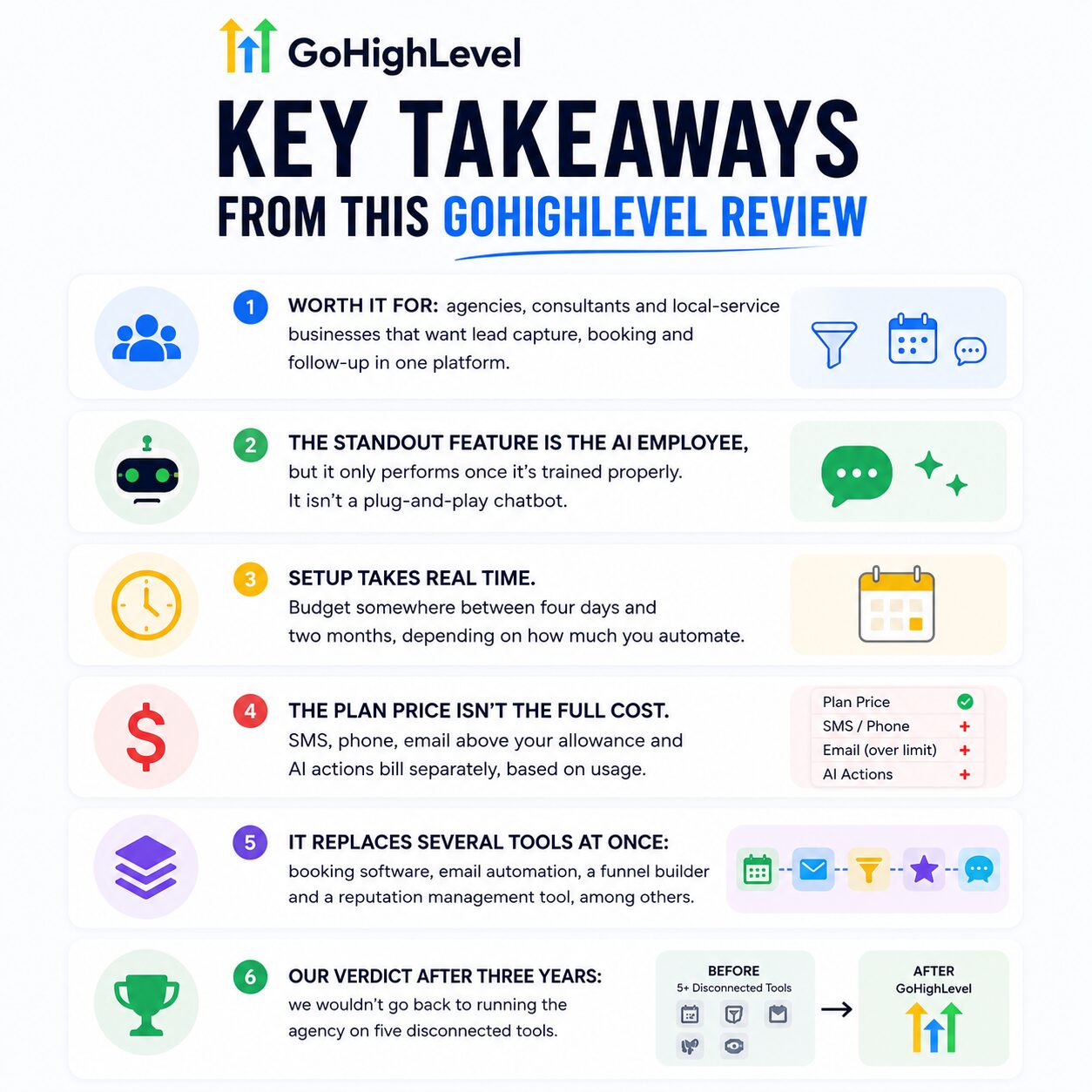
Key Takeaways From This GoHighLevel Review
- Built for agencies and local-service businesses
- AI Employee only performs once trained properly
- Setup takes four days to two months
- Plan price is not the full cost
- Replaces five separate tools at once
- Three years in, we would not go back
What Is GoHighLevel? A Quick Overview Before Our HighLevel Review
GoHighLevel, now commonly branded as HighLevel, is an all-in-one CRM, marketing automation and customer management platform built heavily around agencies and service businesses.
Instead of stitching together a CRM, funnel builder, calendar, email platform, SMS tool, review platform and automation software, HighLevel puts those functions inside one account.
In practical terms, you can use it to:
- Capture and manage leads
- Build websites, funnels and landing pages
- Run email and SMS campaigns
- Automate follow-up
- Manage sales pipelines
- Book appointments
- Collect and manage reviews
- Run AI chat and lead qualification
- Create courses and membership areas
- Manage multiple clients through sub-accounts
- White label parts of the platform on higher plans
The reason our GoHighLevel Review is positive is not that every individual feature is the best tool on the market. It is that the features connect to each other unusually well.
Jump to the part of this GoHighLevel Review you care about:
Why We Moved to GoHighLevel: What Changed Our GoHighLevel Review
This GoHighLevel Review would not be complete without explaining why we made the switch.
Before GoHighLevel, stepping away from the business brought anxiety. Would leads still come in? Would deals move forward? Would a client message sit unanswered for two days? Any owner who has tried to take a proper holiday knows this feeling.
Desktop and mobile access changed that for us. A mobile app is not a new idea, but having everything your business needs to run inside one app, on your phone, is a different experience entirely.
You check pipeline movement, read a client conversation, or approve a contract from wherever you are, without opening a laptop. That single shift removed a huge part of the fear around stepping back from daily operations, and it is one of the reasons this GoHighLevel Review leads with it.
GoHighLevel Review of The AI Employee: The Real Differentiator
This part of the HighLevel Review covers the biggest shift for our team: the AI Employee.
The feature that has changed the most for us is the AI Employee. Trained and primed properly, it answers leads browsing your website at 11pm while you are offline.
It picks up enquiries on Facebook, Instagram, and WhatsApp while you are at an appointment, with your kids, or asleep. Your digital sidekick works the night shift your business never had to hire, one who never calls in sick and never needs a weekend off.
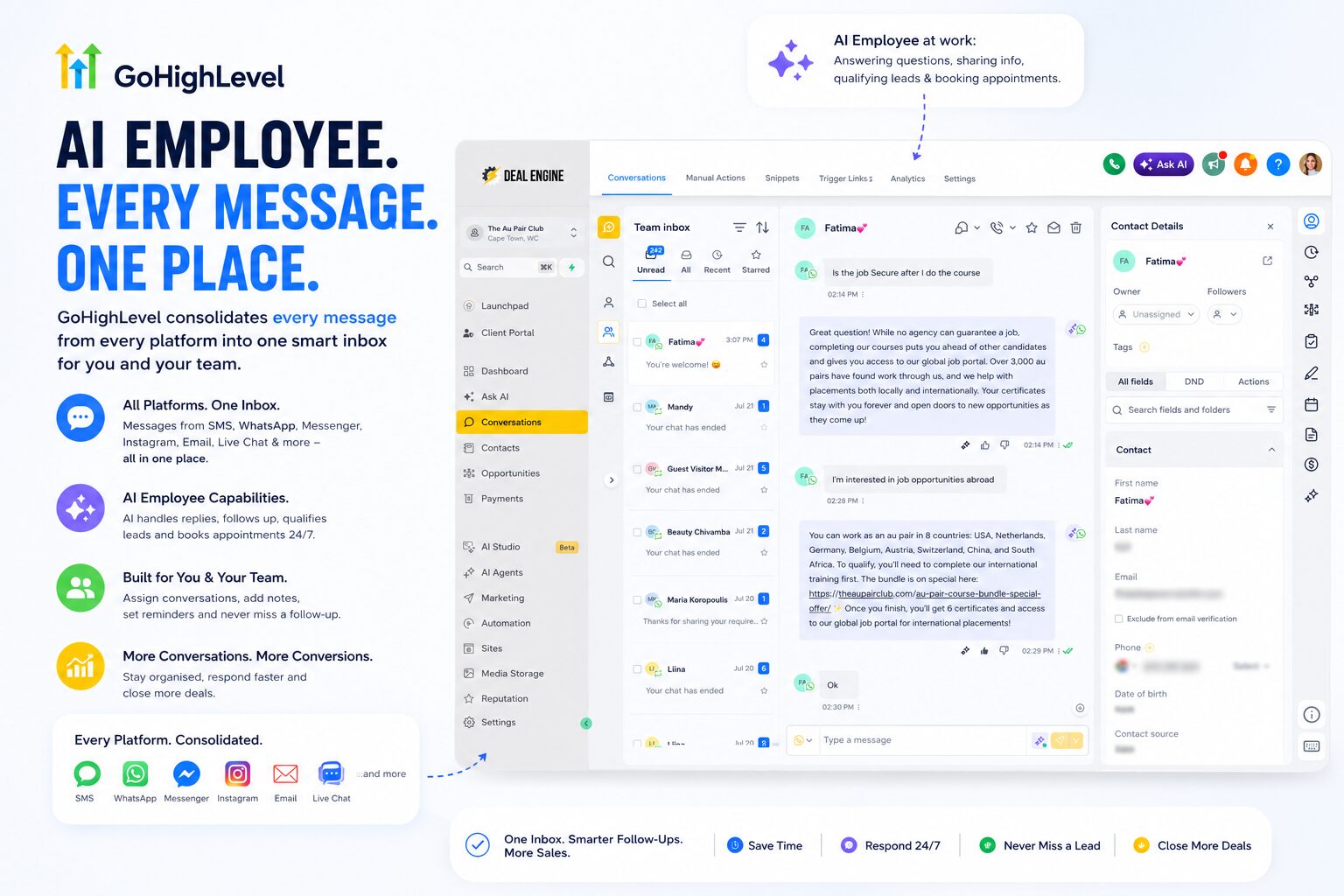
Some scepticism around AI comes from people who typed a single question into a generic chatbot and judged the whole technology on a flat, impersonal answer.
The quality of an AI Employee comes down to the prompt and the training behind it, not the technology on its own. Primed properly, with your tone, your offers, and the questions your customers actually ask, it does not feel like a stock chatbot at all. Any honest HighLevel Review will tell you the same thing.
Treat GoHighLevel like a new hire, not software
Building a good AI Employee takes work, and we tell every client this upfront. On day one, a new team member understands the basics but is not your best salesperson yet.
The AI Employee is the same. You train it, correct it, and refine it over weeks, not hours. That is the honest timeline.
We describe the AI Employee to clients as a digital sidekick, not a replacement.
The quality of an AI Employee comes down to the prompt and the training behind it, not the technology itself. Treat it like a new hire on day one, not a finished product out of the box, and it earns its place fast.
Deployed across a website, Facebook, and Instagram, it becomes a genuine extension of the team, answering, qualifying, and booking, so the humans on your team focus on the leads who need a human.
The AI Employee is the reason most people never go back.
Answering, qualifying and booking while you sleep is the single feature that changes how much of your business you can step away from.
Would rather not build it yourself? We set it up and manage it for you.
GoHighLevel Is Not Just a Marketing Tool
One misconception we hear often when people search for a GoHighLevel Review: they assume this platform is built for marketing agencies alone. That is not the case.
- A beauty studio client uses it daily to manage bookings, reviews, and staff schedules
- An appliance repair client runs their entire job list from the mobile app
- Coaches, e-commerce sellers, and service businesses of every kind use the platform in ways that have nothing to do with running ads
The common thread is not industry. It is the wish to automate the repetitive parts of running a business, without losing the personal feel clients expect.
GoHighLevel Interface: What Our GoHighLevel Review Found in Daily Use
The first few days inside HighLevel can feel busy. There are a lot of menus because there are a lot of functions.
Once the account is structured properly, the interface becomes much easier to work with. The key is not trying to use every feature at once. We usually organise the account around the few areas a team actually needs daily: conversations, opportunities, calendars, contacts and reporting.
For agencies, the separation between agency view and client sub-accounts takes some getting used to, but it is also one of the reasons the platform scales so well across multiple businesses.
👉 Bottom line: The interface has a learning curve, but the complexity reflects how much the platform can do. HighLevel feels far simpler once you build the dashboard around your actual workflow instead of trying to use every menu.
GoHighLevel Review: Can You Build a Website With GoHighLevel?
This GoHighLevel Review gets asked this often enough that it earns its own section.
Yes. The platform includes a drag-and-drop website builder with templates for most industries, plus an AI website builder that generates a full page or funnel from a text prompt if you would rather start from a rough idea than a blank template.
Hosting is included, and you connect a custom domain rather than running on a generic subdomain. Booking calendars, lead forms, surveys, and two-step order forms embed directly into the page, so the site and the CRM behind it are the same system, not two tools bolted together.
We build client websites inside this platform regularly, from single-page booking sites for beauty studios through to multi-page sites for clinics and trades businesses. The advantage over a standalone website builder is not the page itself.
A lead who fills in a form on the site lands straight in the pipeline, with the AI Employee following up before the page has finished loading for the next visitor. That single detail comes up in almost every HighLevel Review written by an agency that actually builds inside the platform.
GoHighLevel Review: Funnels and Landing Pages
For most agencies and service businesses, yes.
HighLevel lets you build landing pages, multi-step funnels, forms, surveys, calendars and checkout flows inside the same environment as the CRM. You can also duplicate successful assets across client accounts instead of rebuilding the same structure from scratch every time.
We would still choose a specialist design tool if the only goal were highly custom visual design. But that is not the comparison that matters for most businesses.
The real question is whether your funnel needs to connect directly to your pipeline, lead assignment, follow-up, appointment booking and reporting. If the answer is yes, HighLevel becomes much more compelling.
👉 Bottom line: HighLevel is strongest when the funnel is not treated as a standalone page. The real value is what happens after the form is submitted, because the lead can move straight into automation, booking and pipeline follow-up without another tool in the middle.
GoHighLevel Review: What GoHighLevel Actually Replaces
This GoHighLevel Review keeps circling back to one theme: consolidation.
Across agency communities online, the same story comes up again and again: businesses cancel a stack of separate subscriptions once the platform is properly set up. Everything that used to live in five different places now lives in one.
| What You Were Probably Paying For Separately | Now Handled Inside GoHighLevel |
|---|---|
| Calendly or a booking app | Built-in calendars with round-robin and service-based booking |
| ActiveCampaign or Mailchimp | Email and SMS automation, triggered by pipeline stage |
| ClickFunnels | Funnel and landing page builder |
| A reputation or review management tool | Automated review requests across Google and Facebook |
| A separate course or membership platform | Built-in courses and memberships |
Agencies routinely report cutting several hundred dollars a month in tool subscriptions once they consolidate properly. Our own experience matches that, and it is a point worth repeating in any serious GoHighLevel Review.

The math worth doing before you sign up: add up what you currently pay for a booking tool, an email platform, a funnel builder, and a reputation tool. Most agencies find that total sits well above a single plan.
GoHighLevel Review: Features We Actually Use Every Week
A strong GoHighLevel Review should separate the feature list on the sales page from the features people actually use after the novelty wears off.
For us, the most important parts are the CRM, Conversations inbox, workflows, calendars, websites and funnels, review automation, reporting, AI Employee and client sub-accounts. Those are the features that replaced separate software and changed how the agency operates day to day. That practical use is what shapes this GoHighLevel Review rather than the feature list on a sales page.
GoHighLevel Review: HighLevel Email Marketing
HighLevel lets you send one-off campaigns, build automated nurture sequences and trigger email based on what a lead does inside the CRM.
The strength is not simply sending email. It is what happens around the email. A contact can click a link, move pipeline stage, receive a follow-up, get assigned to a salesperson or enter another workflow without leaving the same platform.
Our warning: do not treat deliverability as automatic. Authenticate your sending domain properly, keep your lists clean and warm up sending sensibly. We would not move a large, revenue-critical database into any new email platform without testing first.
👉 Bottom line: HighLevel email is strongest as part of a multi-channel follow-up system. If email is your entire business model, a dedicated platform may go deeper. If email needs to work with SMS, CRM stages, bookings and lead behaviour, HighLevel makes far more sense.
GoHighLevel Review: HighLevel CRM and Conversations
The CRM is the centre of HighLevel. Contact records, pipeline stages, appointments, conversations and automations sit around the same person rather than living in different systems. It is also one of the strongest reasons this HighLevel Review scores the platform highly.
The Conversations view is particularly useful for a service business because messages from different channels can be handled from one place. That reduces the usual problem of one staff member checking email, another checking social DMs and somebody else forgetting the website chat.
For agencies, the sub-account structure is just as important. Each client can have a separate database, pipeline, calendar and automation setup without the agency needing a completely different software stack for every account.
👉 Bottom line: The CRM is where HighLevel stops feeling like a collection of features and starts feeling like one system. Conversations, appointments, opportunities and automations all sit around the same contact record.
GoHighLevel Review: HighLevel Reputation Management
Review generation is one of the features we use heavily for local-service clients. HighLevel can automate review requests after a completed job or appointment, track responses and keep reputation management inside the same customer journey.
That matters because review collection usually fails for one simple reason: somebody has to remember to ask. Automation removes that dependency.
For businesses where Google visibility and local trust matter, this can be more commercially useful than several of the platform’s flashier features.
👉 Bottom line: If reviews influence whether people choose your business, HighLevel’s reputation tools are worth using. The biggest win is consistency: the system can ask for feedback automatically instead of relying on somebody remembering after every job.
GoHighLevel Review: HighLevel Integrations
HighLevel connects with major advertising, payment, calendar and communication tools, and additional connections can be handled through services such as Zapier or Make when needed.
But the more important point from our three years of use is that a good HighLevel build often reduces the number of integrations you need. If the CRM, form, booking calendar, pipeline, email, SMS and review request already live together, there is less to stitch together and less to break.
👉 Bottom line: A good HighLevel account should reduce your dependence on integrations, not create more of them. Use external connections where they add real value, but keep the core customer journey inside one system wherever possible.
GoHighLevel Courses and Communities
HighLevel also supports courses, memberships and community-style delivery. We would not tell a pure course creator to choose it solely for that reason, because dedicated learning platforms may offer a more polished education experience. That distinction matters in an honest GoHighLevel Review.
Where it becomes useful is when the course is part of a wider sales journey. A lead can buy, be added to a product, receive onboarding, book a coaching call and stay inside the same CRM record.
👉 Bottom line: HighLevel may not replace the best specialist course platform for every creator. But if courses or memberships are part of a broader lead generation, sales and client-management system, the all-in-one advantage becomes much more valuable.
GoHighLevel Email Pricing That Does Not Punish You for Growing Your List
One thing worth calling out on its own: how email pricing works. Platforms like MailerLite and Mailchimp price you on the size of your database. Grow your list, and your monthly bill grows with it, whether those contacts are engaged or not.
GoHighLevel does not work that way. You pay for usage, what you send, not how many contacts sit in your database. A list of 50,000 people costs nothing extra to hold. You only pay when you email them.
For a business actively growing its list, and most of our clients are, this difference compounds over time. It is one of the smaller details a rushed HighLevel Review tends to skip.
HighLevel Review: Sales Pipelines That Actually Work for New Leads
This HighLevel Review would be incomplete without the pipeline, since it is where the platform quietly beats bigger-name CRMs.
Having used tools like HubSpot and Salesforce before, the pipeline stands out. It does the same job, and building automations into it is noticeably more straightforward.
Every stage in your pipeline triggers its own automation behind the scenes. Move a new lead’s card into “Contacted,” and the platform releases a welcome pack automatically. No one on the team needs to remember to send it.
The same logic works for leads who are not ready yet. Move a deal into a stage like “Not Interested Right Now,” and a time-based trigger sits behind it. If that card sits there for more than two weeks, the platform sends a follow-up on its own, something as simple as an email checking in.
None of this needs custom development. It is built directly into how the pipeline stages work, which makes it accessible to a service business owner, not only a technical team.
GoHighLevel Review vs HighLevel Review: Same Platform, Two Ways People Search
Worth clearing up before we go further. A GoHighLevel Review and a HighLevel Review cover the same platform. “GoHighLevel” is the full brand name. “HighLevel” is the shortened version people use once they know the product. Both terms lead back to the same software, the same pricing, and the same AI Employee.
| What People Search | What They Are Actually Looking For |
|---|---|
| “GoHighLevel Review” | First-time buyers researching the full platform before signing up |
| “HighLevel Review” | Existing users or agencies comparing notes on day-to-day use |
This GoHighLevel Review, and every HighLevel Review we publish, uses both terms because both groups land here. If you searched either phrase, you are in the right place.
GoHighLevel Review: One Dashboard Instead of a Dozen Tools
GoHighLevel connects more than 100 tools into a single dashboard. That consolidation is one of the biggest reasons we would not go back to running the agency without it.
Ask yourself: if you took two weeks off right now, would you know who was contacted, what was said, which deals closed, who booked an appointment, and how people feel about your business online?
Most owners running five separate platforms could not answer that with confidence. Switching between apps to find one answer eats hours every week that most owners never account for.
With everything connected, that switching disappears. We rarely log into the standalone tools we once relied on. This platform has become the single source of truth for our agency and our clients, which is the main reason we keep coming back to it in every GoHighLevel Review we write.
Access levels, and building your own view in GoHighLevel
Senior staff see financials. Sales staff see sales data only. A beauty client’s front desk team sees the day’s bookings, not every therapist’s private notes. You build the permissions around how your business actually works.
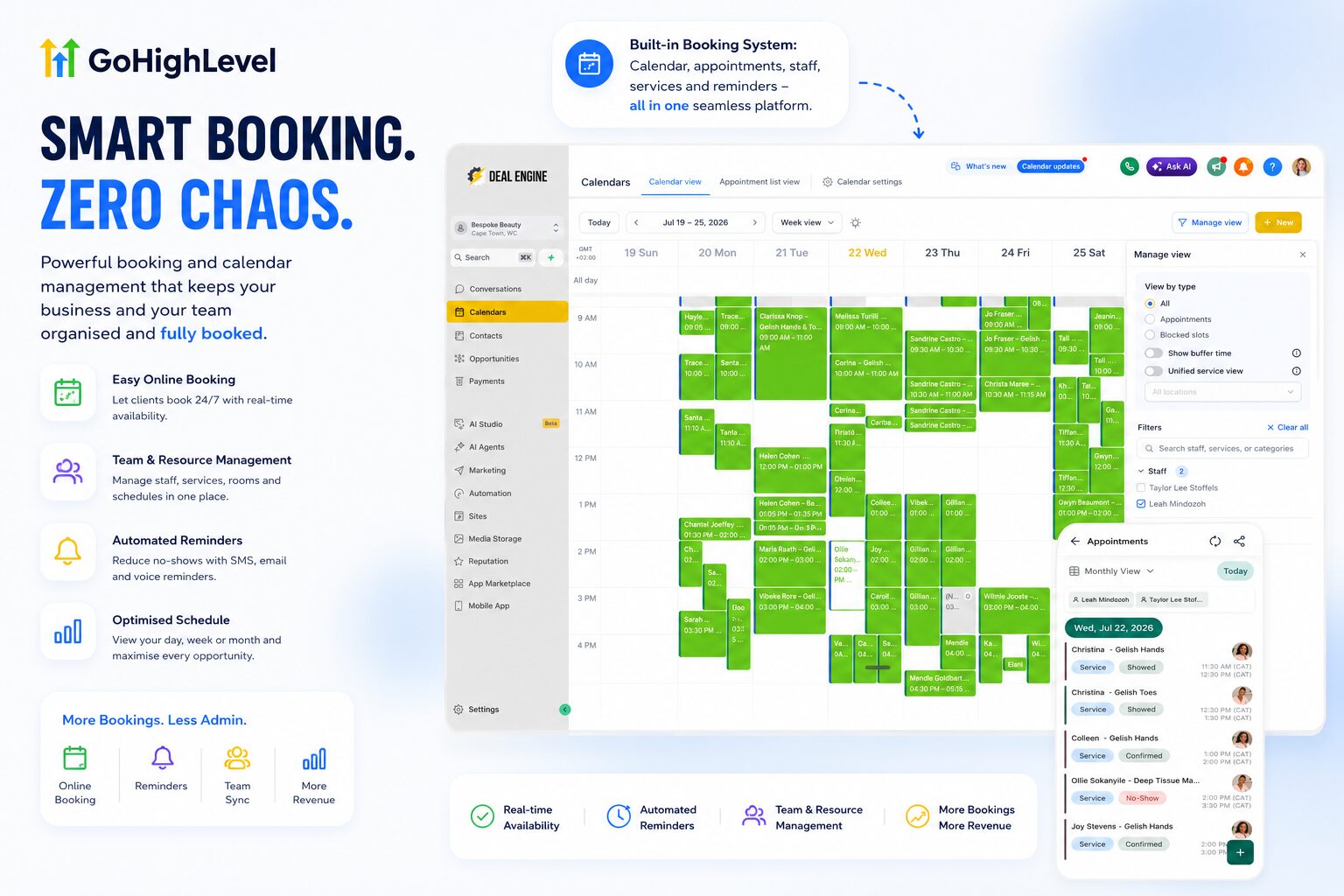
You also build your own dashboard. What you see when you log in is up to you, not a fixed template the software hands you.
This is where the platform pulls ahead of point solutions. Tools like HubSpot and MailerLite do not let you customise the way GoHighLevel does. Booking platforms like Booksy and Calendly cannot match the calendar customisation either.
GoHighLevel Review: What Are the Disadvantages of GoHighLevel?
Every honest GoHighLevel Review needs a straight answer to this one. Here is ours, based on three years inside the platform.
| Disadvantage | What We Have Found in Practice |
|---|---|
| The learning curve is real | Not something you set up meaningfully in an afternoon. Budget weeks, not hours, especially for automation and the AI Employee. |
| Support quality varies | Your experience depends on your tier. On the agency tier, we have found support solid. Lower tiers report a mixed experience. |
| AI features carry usage costs | Beyond the plan price, AI actions, SMS, and phone use bill separately. Budget for this before you sign up. |
| Email deliverability needs setup work | Out of the box, email lands in spam without it. Domain authentication (SPF, DKIM, DMARC) needs doing properly. |
| Individual features are not always best-in-class | A dedicated email tool or funnel builder may go deeper on that one feature alone. You trade some depth for breadth. |
| Can feel like overkill for very small operations | A single business with simple needs and no plans to scale may not need the Starter plan at all. |
GoHighLevel Review: What We Would Change About HighLevel
Advocating for a platform is easy. Naming what still frustrates us after three years is the part most reviews skip, so this GoHighLevel Review does it here.
The billing screen should show projected usage. You see what you have spent, not what you are on track to spend. A forecast would stop the surprise invoices that generate most of the complaints we read online.
Updates arrive faster than documentation. New features ship at real pace, which is a strength, but the help articles occasionally lag behind the interface. Ask AI covers most of that gap now, though not all of it.
The automation builder rewards planning you have not done yet. A beginner can build something that works and still build it in a way that becomes hard to unpick six months later. There is no gentle warning when you are creating future maintenance for yourself.
Deliverability setup should be enforced, not optional. Letting a new account send email before domain authentication is complete is how businesses damage their sending reputation in week one. It should be a required step, not a recommended one.
None of these are reasons to avoid the platform. They are the things we would fix if someone asked, and any GoHighLevel Review that claims there is nothing to fix is not a review.
GoHighLevel Review: Pros and Cons at a Glance
Every GoHighLevel Review should give you a fast, honest scan before you read the detail. Here is ours, side by side.
| Pros | Cons |
|---|---|
| Replaces five or more separate tools with one platform | Real learning curve, especially in month one |
| AI Employee handles enquiries around the clock | AI Employee needs proper training before it performs |
| Pipeline automations run without custom development | Usage fees for SMS, calls, and AI bill separately |
| Email pricing based on usage, not list size | Email deliverability setup takes real effort upfront |
| Website builder, CRM, and follow-up live in one system | Some individual features are not best-in-class on their own |
| Fully customisable dashboards and permission levels | Can feel like more platform than a very small operation needs |
| White label and resell option on the Agency Pro plan | Reselling means you inherit the support burden |
Weighed against each other, the pros in this GoHighLevel Review outnumber the cons for the businesses this platform is actually built for: agencies, consultants, and local-service businesses. The cons in this HighLevel Review matter most for solo operators with no plans to grow or automate further.
The honest summary: every disadvantage in this GoHighLevel Review is a setup cost, not an ongoing one. Once the platform is built properly, the pros compound every month after.
👉 Bottom line: For the businesses HighLevel is built for, the trade-off is simple: more setup at the beginning in exchange for fewer disconnected systems later.
GoHighLevel Review: SaaS Mode and White Labelling
HighLevel is unusual because agencies can do more than use the software internally. On the right plan, you can package access under your own brand, create client sub-accounts and build a recurring software-style offer around your own setup, support and automation.
That can be attractive, but we would not recommend jumping into SaaS Mode before you know how to support the system. White labelling the platform does not remove the operational work behind it. Your clients will still expect somebody to answer when a workflow breaks, a number stops sending or a user cannot find a setting.
The model works best when you already have a repeatable build, documented support and a clear niche or use case.
👉 Bottom line: SaaS Mode can create recurring revenue, but it also turns your agency into the first line of software support. Build the system and support process first. Add the white label second.
GoHighLevel Alternatives: How It Compares
No GoHighLevel Review is complete without an honest look at what else you could buy instead. We have used or built inside most of these, and this GoHighLevel Review scores them on the same basis.
| Alternative | Where It Wins | Where GoHighLevel Wins |
|---|---|---|
| HubSpot | Enterprise reporting, governance, a polished interface and a deep integration marketplace | Cost at scale, multi-client sub-accounts, and white labelling. HubSpot pricing climbs steeply per seat and per contact |
| ClickFunnels | A smoother page editor and a funnel-first workflow for people who live in funnels | CRM, pipeline, booking and follow-up in the same system rather than a funnel tool plus a stack around it |
| Keap | Mature automation and strong small-business invoicing | Agency sub-accounts, white label, and a far gentler price for multiple clients |
| Vendasta | A genuine marketplace of resellable products beyond marketing automation | Depth in the CRM and automation layer, and lower cost to run your own branded platform |
| Kajabi | Course delivery and the creator experience | Lead capture, pipelines and local-service booking. Kajabi is built for creators, not service businesses |
| A custom stack | Best-in-class depth on each individual tool | One bill, one login, one place to train staff, and nothing to rebuild when an API changes |
The honest rule of thumb: if you manage one brand and need best-in-class depth on one function, a specialist tool wins. If you manage several clients or several locations and need everything talking to everything, this GoHighLevel Review lands firmly on the all-in-one side.
👉 Bottom line: Choose HighLevel for connected breadth, not because it beats every specialist tool feature-for-feature. If one function matters more than everything else, a specialist platform may still be the better choice.
Compared everything and landed here?
Start on the Unlimited plan if you manage more than one business or client. Starter locks you out of the sub-accounts most people want by month three.
Start your GoHighLevel account →
Would rather not build it yourself? We set it up and manage it for you.
GoHighLevel Review: Switching From Another CRM
Most people reading a GoHighLevel Review already run something else. Here is what migration actually involves, and it is the part this GoHighLevel Review gets asked about most by existing HubSpot and ActiveCampaign users.
Export before you cancel anything. Contacts, custom fields, tags, deal stages, email templates and your automation logic. Keep the old account live for at least one full billing cycle after you go live on the new one.
Map your fields first, import second. The single biggest migration mistake we see is bulk importing a contact list before deciding which custom fields matter. You end up with duplicated data and automations firing on the wrong triggers.
Rebuild your automations rather than replicating them. Most businesses carry automations they built years ago and never revisited. A migration is the cheapest opportunity you will ever get to delete the ones nobody uses.
Warm your sending domain. Moving an email list to a new platform without domain authentication and a gradual send ramp is how deliverability collapses in week one.
Run both in parallel for two weeks. New enquiries go to GoHighLevel, existing sequences finish on the old system. It costs one extra month of subscription and removes almost all of the risk.
For a business with a few thousand contacts and a handful of automations, a careful migration takes one to two weeks. For a CRM built out over years with custom integrations, plan for a month and involve whoever built the original setup.
GoHighLevel Review: HighLevel Support After 5 Years
Support is one of the areas where HighLevel reviews online are mixed, so it deserves its own section. Our HighLevel Review would be incomplete if we only covered the parts we like.
On the agency tier, our experience has generally been solid, but support quality is not the reason we recommend the platform. The reason is the system itself.
HighLevel also has a large help library, onboarding material and an increasingly useful built-in AI assistant. Even so, complex automations can still require somebody who understands how the account was originally designed.
Our advice: document your workflows as you build them. A platform this flexible becomes difficult to maintain if only one person understands why an automation exists.
👉 Bottom line: Support matters, but account design matters more. A clean, documented build prevents far more problems than a support ticket can fix after the fact.
GoHighLevel Review: Starter vs Unlimited vs Agency Pro
Choosing a tier is the first real decision in any GoHighLevel Review journey. Here is how the three plans stack up against each other, side by side.
| Starter | Unlimited |
|---|---|
| $97/month, one business, up to 3 sub-accounts | $297/month, unlimited sub-accounts for multiple clients |
| No white-label option | White-label available on request |
| Best for a solo operator testing the platform | Best for an agency running several client accounts |
| Unlimited | Agency Pro (SaaS Mode) |
|---|---|
| $297/month, you manage accounts directly | $497/month, you resell the platform under your own brand |
| Clients know they are using GoHighLevel | Clients see your branded system, not GoHighLevel |
| Simpler support structure | You handle first-line client support yourself |
Our recommendation for most first-time buyers reading this GoHighLevel Review: start on Unlimited. Starter locks you out of the sub-accounts you will likely want within the first few months, and Agency Pro adds a support burden most businesses are not ready to carry on day one.
GoHighLevel Review: How Much Does GoHighLevel Cost a Month?
This GoHighLevel Review would not be honest without a full pricing breakdown.
Three main tiers cover most buyers. Paying annually knocks the effective monthly cost down by roughly 17%, since the annual price works out to about ten months’ worth rather than twelve.
| Plan | Monthly Price | Annual Price | Best For |
|---|---|---|---|
| Starter | $97/mo | $970/yr | Solopreneurs and single businesses (up to 3 sub-accounts, no white-label) |
| Unlimited | $297/mo | $2,970/yr | Marketing agencies with multiple clients (unlimited sub-accounts) |
| Agency Pro (SaaS Mode) | $497/mo | $4,970/yr | Agencies white-labelling and reselling the platform as their own software |
The plan price is not the full cost. SMS, phone, email above your included allowance, and AI actions bill separately, based on usage. Budget for this before signing up rather than after your first invoice arrives.
GoHighLevel Review: On What Usage Fees Actually Look Like
Rather than talk about usage fees in the abstract, here is an actual account. The Au Pair Club, a global childcare platform we run outside the agency, gives a genuine month-by-month picture.
| May 2026 | Amount |
|---|---|
| AI | $5.3785 |
| Communication | $0.0008 |
| Wallet subscriptions | $11.00 |
| Workflow (premium features) | $0.1680 |
| Total | $16.55 |
| June 2026 | Amount |
|---|---|
| AI | $4.6432 |
| Communication | $0.0041 |
| Wallet subscriptions | $11.00 |
| Workflow (premium features) | $0.2280 |
| Total | $15.88 |
| July 2026 | Amount |
|---|---|
| AI | $5.1423 |
| Communication | $15.9171 |
| Wallet subscriptions | $11.00 |
| Workflow (premium features) | $0.1800 |
| Total | $32.24 |
Three months, one account, and the total never crossed $33. The baseline barely moves: the $11 wallet subscription stays fixed, and AI usage stayed under $6 every month shown.
What shifted in July was communication volume. The business ran a WhatsApp marketing campaign advertising its childcare courses on special, exactly the kind of spike that pushes a usage fee up for a month.
Even at its highest, the entire month’s usage fee sits well under the cost of a single hour of admin time in most markets.
GoHighLevel Investment Food for Thought: What Is Your Hourly Rate?
Usage fees are a genuine disadvantage, and we have said so above. Before writing them off, work out your own hourly rate first.
If replying to enquiries, chasing bookings, and answering the same handful of questions manually costs you even one hour a week, that hour is worth more than an entire month of usage fees on an account like the one above. Compare the usage fee against the hours it replaces, not against zero.
For the full breakdown, see our GoHighLevel Pricing Explained guide.
Now you know the real monthly cost, plan and usage together.
No surprises left. The trial costs nothing and the first month tells you whether the maths works for your business.
Start your GoHighLevel account →
Would rather not build it yourself? We set it up and manage it for you.
GoHighLevel Review: Is HighLevel Good for Beginners?
This GoHighLevel Review gets asked this constantly, so here is a direct answer.
Yes, with one condition: you follow a simple setup plan rather than trying to build everything on day one.
Think of it the way you would think about moving into a house with far more rooms than your last place. You do not furnish every room in the first week. You start with the kitchen and the bedroom, the parts you use daily, and fill in the rest over time.
GoHighLevel works the same way. It is beginner-friendly once your basics are set: profile, connections, calendar. It performs best when your leads, booking, and follow-up live in one place, rather than stitched together across three separate tools.
Beginners struggle when they skip that groundwork and jump straight into complex automations before the foundation is in place. This is a point every HighLevel Review worth reading will make clearly.
GoHighLevel Review: The Honest Downside Is Setup Time
This HighLevel Review is not going to pretend setup is instant.
Here is the part an advocate post still owes you straight: getting fully set up is slow.
Our own onboarding process took months to automate and streamline properly, and we say that as a team working inside the platform every day.
Most people we speak with reach a working understanding somewhere between four days and two months, depending on how they plan to use it and how complicated they choose to make it. The tool itself is not difficult.
The slow part is almost always the business behind it: deciding what to automate, in what order, and how far to take it.
Even inside our own team, we found it more effective to let people become the go-to person for specific features rather than expect everyone to master the whole platform at once.
GoHighLevel Review Advice: Have a Goal Before You Buy GoHighLevel
Our GoHighLevel Review keeps returning to this point: buy with a goal, not because it is trending.
Before opening your wallet, decide why you want the platform. We got GoHighLevel because it made internal management easier, giving us visibility over everything from one place.
We only packaged it for clients once we understood it ourselves, then narrowed the offer from there.
How you package it depends entirely on your goal.
Some agencies build a full-service offer across every feature.
Others go narrow: Review Harvest, for example, built its entire business around the review collection side of the platform, sharpening business visibility in search and maps.
Do not buy it because everyone else has it.
It is popular for a reason, and it does the job well, but it carries a real cost depending on your tier. That balance is the whole point of writing an honest GoHighLevel Review instead of a sales pitch.
A note from our own onboarding: the businesses that get the most out of GoHighLevel are the ones that treat month one as setup, not results. Every GoHighLevel Review that promises overnight results is skipping the part that actually matters.
GoHighLevel Review of What The First 90 Days Look Like
| Weeks 1 to 2 | Weeks 3 to 8 | Weeks 9 to 12 |
|---|---|---|
| Profile, connections, calendar, domain authentication | AI Employee training, pipeline automations, website build | Refinement, reporting review, full handover to the team |
This GoHighLevel Review has walked dozens of businesses through exactly this timeline. Rushing it is the single biggest reason a HighLevel Review turns sour in the first month.
GoHighLevel Review Advice: Keep GoHighLevel Simple
This GoHighLevel Review keeps repeating one rule because it matters: keep it simple.
The first rule we follow with every client build is to keep it simple. If we know we send ten proposals a week, we automate that. If we send twenty contracts a month, our team releases them from the platform, whether they are at a desk, at the gym, or on the way to dinner.
Long automations are not the enemy. Automating an entire lead journey, from first enquiry to signed contract, saves enormous time, provided it still feels like a custom experience to the person on the other end.
Do not rebuild what already exists in GoHighLevel
Where we have seen people go wrong is trying to rebuild what already exists. We know an agency owner who set out to rebuild the platform’s built-in AI assistant from scratch, branded as his own.
The effort went nowhere, because clients do not care about the branding behind a tool. They care whether it solves the problem in front of them.
GoHighLevel Review: HighLevel Ask AI
This GoHighLevel Review would be incomplete without covering Ask AI.
One feature worth calling out on its own is Ask AI, the platform’s built-in assistant. It edits records across your account, drafts emails, pulls images into templates, and answers “how do I do this” questions without a support ticket or a video tutorial.
For clients, this means fewer calls to us when they cannot find a setting.
They open the app, ask, and get an answer. It works like having a colleague sitting next to you who has already read the entire manual and does not mind being asked the same question twice.
For our own team, even after three years in the platform daily, Ask AI still earns its place on a day when someone is buried in meetings and cannot remember where the email marketing section lives.
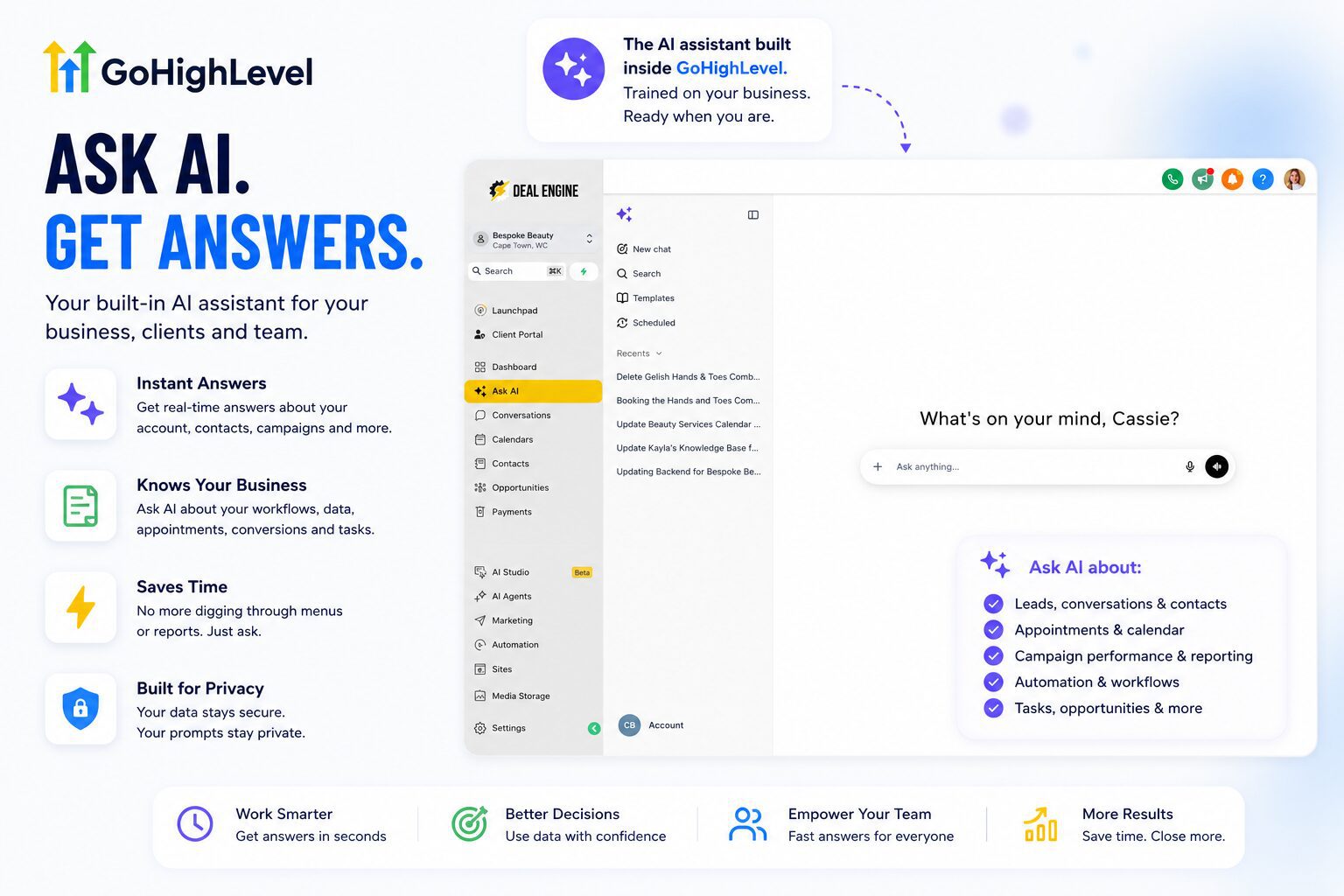
Stuck on something Ask AI cannot answer? A search engine query like “how do I do X in GoHighLevel” pulls from the platform’s own help documentation surprisingly well.
GoHighLevel Review: Our Onboarding Checklist for New Accounts
This GoHighLevel Review ends its practical section here: how to actually get started.
Whatever pricing tier you land on, start with the basics before touching automation or your AI Employee. This is the order we walk clients through:
- Set up your account and complete your profile: name, photo, email signature
- Connect your social accounts, Google review profile, and any existing invoicing or booking tools
- Once connected, your reporting section starts pulling stats automatically from Google, Facebook, Instagram, and TikTok ads
- Connect your business email, and set up domain authentication properly rather than skipping it
- Connect your work or personal calendar, if your business runs on digital bookings
A chiropractor or beauty studio benefits from step five straight away, so the AI Employee never double-books a personal appointment against a client slot. A trades business still running on a paper diary might skip this step for now.
Doing the basics first gives your account the data it needs before you move into building workflows or training your AI Employee. We recommend a phased rollout: basics first, confidence second, complexity last.
That checklist is your first week.
Work through it in order and you will have a functioning account before you touch a single automation.
Start your GoHighLevel account →
Would rather not build it yourself? We set it up and manage it for you.
GoHighLevel Review: Who Should Buy HighLevel and Who Should Not
This GoHighLevel Review would not be useful without a clear answer on fit.
| Good Fit | Poor Fit |
|---|---|
| Marketing agencies managing multiple clients | Pure e-commerce stores better served by Shopify and Klaviyo |
| Local-service businesses: beauty, chiropractic, appliance repair, home services, legal intake | Enterprise RevOps teams needing strict governance |
| Consultants and freelancers selling done-with-you setup | Anyone wanting a plug-and-play tool with zero setup time |
| Coaches and course creators who also need lead follow-up | A single, very small operation with no plans to grow or automate |
GoHighLevel Review: DIY Setup or Bring in a Team?
Everything covered in this HighLevel Review is achievable entirely on your own. It is not a secret system locked away from solo business owners.
It takes time, real time, spread across weeks, while you are also running the business the platform is meant to support.
If you do not have the time to build this yourself, or you want a team who has already done it for beauty studios, clinics, trades businesses, and everything in between, that is what we do every day.
We build the AI Employee, the automations, the booking flow, and the reporting so it works from week one instead of month three.
Our done-for-you build gives you the full system: AI Employee, booking calendars, email and SMS marketing, review management, all built and managed for a fixed monthly fee, no contract.
Why Trust This GoHighLevel Review and HighLevel Review?
We are not reviewing HighLevel from screenshots, a temporary login or a list of features copied from the pricing page.
Optimus has used the platform for roughly three years as part of our own agency operations and across client accounts. We have built websites, pipelines, calendars, review systems, lead follow-up, AI Employees, automations and reporting inside it.
We have also dealt with the unglamorous parts: migrations, domain authentication, staff training, broken workflow logic, usage charges and the time it takes to turn an empty account into something a real business can rely on.
That hands-on experience is the basis of this HighLevel Review.
GoHighLevel Review FAQ: Questions Buyers Ask Us About GoHighLevel Before Signing Up
This GoHighLevel Review closes with the questions we get asked most often.
Is GoHighLevel legit?
Yes. It is a genuine platform reviewed by thousands of users on G2 and Trustpilot. Not every business needs it, but the platform itself is not in question.
Is GoHighLevel worth it?
For agencies, consultants, and local-service businesses using most of the platform, yes. For solo creators, pure e-commerce, and enterprise teams, usually not.
What do people use GoHighLevel for?
Lead capture, automated follow-up, booking, sales pipelines, SMS and email marketing, reputation management, client reporting, and, on higher tiers, reselling the platform under your own brand.
Automated follow-up is worth calling out on its own. You set up SMS automation and phone-based follow-up, so a lead gets a response within minutes instead of whenever someone next checks their phone.
On our own accounts, that is the difference between a lead going cold overnight and a lead getting booked before the business owner even wakes up.
Can you build a website with GoHighLevel?
Yes. The drag-and-drop builder covers most needs without touching code, and the template library gives you a head start rather than a blank page.
The AI website builder takes this further. Describe what you need in a prompt, and it generates a starting page for you to refine, rather than building from nothing.
Hosting is included, so there is no separate hosting bill to manage. Booking calendars, lead forms, and surveys embed straight into the page, which matters most for a lead generation build: the site and the follow-up system live in the same place.
What are GoHighLevel snapshots?
Snapshots come up in almost every GoHighLevel Review written by an agency. A snapshot is a saved template of an entire account: workflows, pipelines, calendars, funnels, email templates and custom fields, packaged so it can be loaded into a new sub-account in minutes.
For an agency this is the single biggest time saver on the platform. Build a beauty studio account once, save it as a snapshot, and the next beauty client starts from a working system rather than an empty account. Our onboarding time dropped by more than half once we built proper snapshots for the industries we serve most.
Does GoHighLevel integrate with other tools?
Yes, three ways, and this is a common question for anyone comparing a GoHighLevel Review against their current stack. Native integrations cover the ones most businesses need: Google, Facebook, Instagram, TikTok, Stripe, QuickBooks and Zoom among them. Zapier and Make cover most of what is not native. An open API handles anything custom.
In practice, the more you use the platform the fewer integrations you need, because the tools you were connecting are already inside it.
Why is my GoHighLevel bill higher than the plan price?
This is one of the most common frustrations reported by new users, and it deserves a straight answer rather than a footnote.
The plan price covers the software. It does not cover SMS, calls, email above your allowance, or AI actions, all of which bill separately based on how much you send and use.
Sign up for the $297 Unlimited plan, launch a busy campaign in your first month, and a bill of $400 or $450 is genuinely possible. It is a usage-based cost that most people simply do not ask about before they sign up.
Ask what a typical month of SMS and AI usage looks like before you commit, and request a sample invoice if the agency or reseller you are working with has one.
How do you cancel a GoHighLevel subscription?
Cancellation is not a single click, and it is worth knowing that going in rather than discovering it when you want out.
The process runs through Settings, then Billing, then a modify or cancel option. You are asked for a reason, then given a final confirmation step. After that, GoHighLevel typically takes 24 to 72 hours to confirm the cancellation by email before the account is actually closed.
Refunds are limited. Outside a short window on new subscriptions, the general policy is no refund for partial months, so cancelling a few days before your next billing date matters more than it would with a simpler monthly tool.
What is A2P 10DLC, and do you need it?
If you send SMS to US numbers, yes, and skipping it is one of the most common setup mistakes we see.
A2P 10DLC is a carrier-run verification system for business text messages. Registering your brand and campaign gets your number recognised as legitimate. Skipping it means messages get filtered, delayed, or blocked outright, which looks exactly like a broken automation when the real cause is an unregistered number.
Registration takes your legal business name, EIN or equivalent, business address, and a description of what you are texting people about. Build this into week one of setup, not something you patch in after messages start disappearing.
Can you white label and resell GoHighLevel?
Yes, on the Agency Pro (SaaS Mode) plan. This is what lets an agency put its own branding on the platform and sell it to clients as its own product, with its own pricing.
We do not disclose the underlying software to our own clients for exactly this reason. What they see is our branded system, not a GoHighLevel login screen.
Worth knowing before you go this route: reselling means you inherit the support burden. Your clients call you, not GoHighLevel, when something breaks.
What do the negative GoHighLevel reviews complain about?
We read them, and the complaints cluster into four themes rather than dozens. Any GoHighLevel Review that ignores them is selling, not reviewing.
Surprise invoices from usage fees. Support response times on lower tiers. Email landing in spam, which is almost always a skipped domain authentication step rather than a platform fault. And the learning curve, from people who expected to be running in an afternoon.
Three of those four are setup problems with known fixes. The fourth, support on lower tiers, is a genuine platform issue and we have said so in our scores above.
How does GoHighLevel compare to HubSpot and ClickFunnels?
| Compared To | Our Take |
|---|---|
| HubSpot | GoHighLevel for agencies and multi-client management. HubSpot for a single brand running enterprise-scale RevOps. |
| ClickFunnels | GoHighLevel if you need CRM, automation, and client accounts together. ClickFunnels if you are a solo builder who lives in funnels all day and wants a smoother page editor specifically. |
Does GoHighLevel have a free trial?
This GoHighLevel Review would be incomplete without mentioning the trial. Yes, a 14-day free trial with full platform access comes with most sign-up flows.
That is enough time to test the pipeline and calendar, though building a working AI Employee properly takes longer than two weeks. Treat the trial as a look at the interface rather than a full test of automation depth.
Go in with a specific goal for those 14 days, rather than clicking around without a plan.
Is GoHighLevel good for real estate agents?
Yes, provided it is configured properly. An unconfigured account is just a monthly expense, and that is especially true for solo agents.
A fully built pipeline for new leads, past clients, and referral sources turns the platform into a genuine assistant for a one-person real estate business. Agents going the DIY route should budget several weeks for setup; agencies or pre-built templates get there faster.
Is GoHighLevel HIPAA compliant?
HIPAA compliance is available as an add-on, not a default setting, which matters for chiropractors, medical aesthetics clinics, and other health-adjacent clients.
Confirm HIPAA configuration directly with GoHighLevel or your agency before handling protected health information on the platform, rather than assuming it is covered by the base plan.
Does GoHighLevel replace my existing CRM entirely?
For most businesses covered in this GoHighLevel Review, yes. The pipeline, contact records, and automation cover what a standalone CRM does, and add booking, website, and marketing on top.
If your existing CRM is deeply built out with years of custom fields and integrations, migrating takes planning. This GoHighLevel Review recommends mapping your existing data before switching, rather than moving everything across in one weekend.
How long until GoHighLevel starts paying for itself?
Most businesses we have worked with see the platform paying for itself within the first two months, once the AI Employee and booking calendars are live.
The maths is straightforward. One extra booked lead a week, from an enquiry that would otherwise have gone unanswered overnight, usually covers the plan price on its own. This GoHighLevel Review has seen that pattern repeat across beauty studios, chiropractors, and trades businesses alike.
Can GoHighLevel handle multiple locations or brands?
Yes. On the Unlimited and Agency Pro plans, you run unlimited sub-accounts, so a business with several locations, or an agency managing several clients, keeps each one separate with its own pipeline, calendar, and reporting.
This is one of the reasons agencies lean on GoHighLevel over single-location tools. A HighLevel Review written from an agency’s perspective will always weigh this heavier than a review written for a single local business.
Does GoHighLevel handle invoicing and payments?
Yes, and it is a point this GoHighLevel Review rates highly. Invoices, recurring subscriptions, payment links, estimates and text-to-pay all sit inside the platform, with Stripe and PayPal handling the processing.
For a service business this closes the last gap in the journey. The enquiry, the booking, the follow-up and the invoice all live in one record rather than being stitched together across a CRM and separate accounting software.
Is GoHighLevel better than building a custom stack?
For most local-service businesses and agencies, yes. A custom stack of separate tools costs more to maintain, breaks more often when one tool updates its API, and takes longer to onboard new staff onto.
This GoHighLevel Review has run both setups. The custom stack gave marginally more depth on one or two individual features. The single platform won on speed, cost, and how quickly a new team member became productive inside it.
Still deciding?
Fourteen days, full access, no commitment. That is a faster answer than any review can give you, including this one.
Start your GoHighLevel account →
Would rather not build it yourself? We set it up and manage it for you.
GoHighLevel Review and HighLevel Review: The Final Buying Decision
| If this sounds like you… | Our recommendation |
|---|---|
| You run an agency managing several clients | Strong fit. Sub-accounts, automation and one shared operating system are where HighLevel earns its keep. |
| You run a service business with regular enquiries | Strong fit. CRM, booking, reviews and automated follow-up can replace several separate tools. |
| You only need email marketing | Probably overkill. A specialist email platform will be simpler. |
| You want zero setup and instant results | Poor fit. HighLevel rewards businesses willing to build the system properly. |
| You want the platform without learning how to build it | Use a done-for-you setup. That is exactly why we built our managed option. |
Our GoHighLevel Review Verdict
This GoHighLevel Review comes down to one honest verdict.
Three years in, GoHighLevel remains the backbone of how Optimus runs client accounts and our own agency. The AI Employee alone has changed how much of the business we step away from without losing leads.
The setup is not fast, and we tell every client that honestly before they start.
Once the foundation is built, going back to five disconnected tools is not something we would choose. That is the honest summary behind every GoHighLevel Review and every HighLevel Review we could write.
If there is one thing every GoHighLevel Review agrees on, it is this: the platform rewards businesses that commit to the setup. Half-built accounts create half-built results. Full builds create the kind of leverage this HighLevel Review has tried to capture throughout.
See the system we build on top of it if you want this done for you, or book a free assessment and we will walk you through what it looks like for your business specifically.